Search Parcels, Values & Tax Records
Find Tuscarawas County property records by owner name, street location or property number, then review the parcel’s market value, land and building details, sales, exemptions, tax district and value history.
This guide explains each search field, the 2025 triennial update, the 2026 tax deadlines, tax-payment options, GIS limits, deed research, value appeals and the exact office to contact when an online record does not answer the question.
Quick answer: use the official Auditor search
Choose Owner when you know a name, Location when you know the street address, or Number when you have the property number. Select the correct tax year, keep both Real Estate and Manufactured Home checked only when the property type is uncertain, and verify the result using at least two parcel facts.
Ten fast facts
After deciding which search path fits your information, open the official Auditor search. Use the separate Treasurer search only when the task concerns the actual tax bill, balance, payment or delinquency.
Choose the problem you need to solve
The page is organised around user actions rather than a list of government links.
Which office controls the property task?
Start with the Auditor to identify the parcel. Move to the Treasurer, Recorder or another office only after you have the property number.
Your task |
Use |
What it provides |
Important limit |
|---|---|---|---|
Find the owner, parcel or value |
Auditor property search |
Owner, location, land use, acreage, values, sales and tax district. |
Owner display is not a certified deed. |
Check a bill or payment balance |
Treasurer tax search |
Current tax amount, payment, delinquency and bill information. |
The Auditor does not collect the payment. |
Pay property tax |
Treasurer Pay Now |
Electronic payment for real estate or manufactured-home tax. |
Processor fees can apply. |
View the parcel on a map |
Tuscarawas Tax Map GIS |
Parcel boundaries, property number, owner, acreage and map context. |
Not a legal boundary survey. |
Find a deed, mortgage or lien |
County Recorder search |
Recorded real-property documents and indexed images. |
Public search does not replace a title examination. |
Compare recent property sales |
Auditor Sales Search |
Filters for price, date, age, living area, acreage and district. |
Not every transfer is a valid open-market sale. |
Estimate future property tax |
Auditor Tax Estimator |
Estimate based on class, district and appraised value. |
Not the Treasurer’s final payable bill. |
Challenge the market value |
Board of Revision |
Formal property-value complaint and case tracking. |
The Board does not remove tax levies. |
Search Tuscarawas County property records
Prepare one reliable search detail
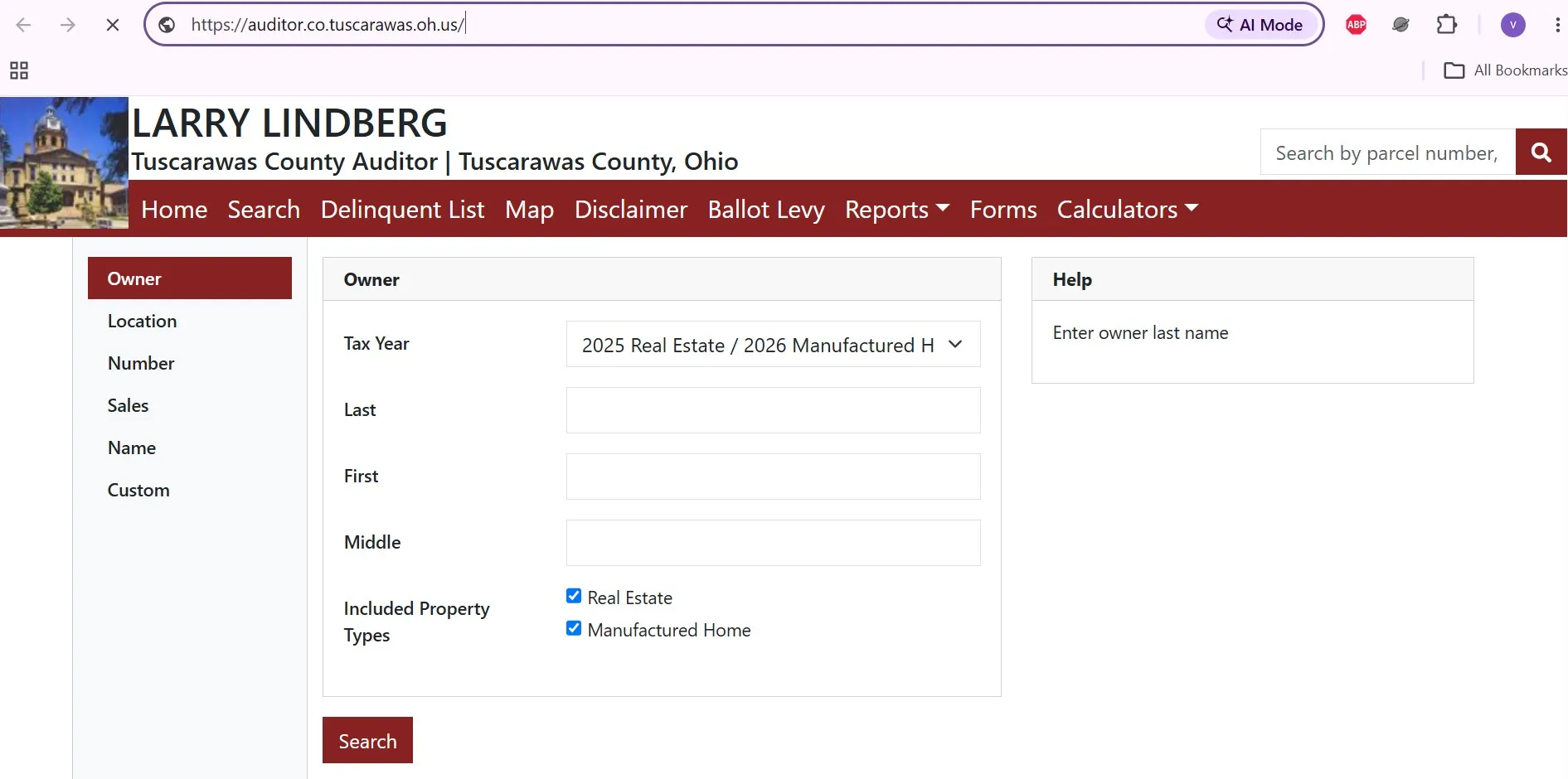
- Select the tax year.
- Enter the last name first.
- Leave First and Middle blank initially.
- Add the first name only if too many results appear.
- Try trust, estate, company or former-owner wording when relevant.
- Verify the property number and location.
- Enter the street number.
- Add the main street name.
- Leave pre-direction and post-direction blank initially.
- Add Street Suffix only when necessary.
- Use Unit Designator and Unit only for a specific suite or unit.
- Remove extra fields when no result appears.
- Copy the number from a bill, deed, Auditor record or GIS result.
- Select the correct tax year.
- Enter the complete property number.
- Try the number without spaces when necessary.
- Keep Real Estate and Manufactured Home checked only if uncertain.
- Confirm the owner and location before proceeding.
How to open and save the correct record
No property record found?
Follow this sequence before concluding that the record is unavailable.
Prepare these details before contacting the Auditor
Understand the parcel record before using it
Field |
What it means |
Practical next action |
|---|---|---|
Property number |
The county identifier linking the parcel to values, taxes and GIS. |
Save it for every later search or phone call. |
Listed owner |
The owner name currently displayed in the Auditor database. |
Use the Recorder deed when legal ownership proof is required. |
Property location |
The physical or situs address associated with the parcel. |
Compare it with the GIS map and tax bill. |
Land use |
The classification describing the parcel’s recorded use. |
Check whether the classification matches the actual use. |
Acres |
The acreage recorded or calculated for the parcel. |
Compare legal acreage, survey acreage and deed information when they differ. |
Appraised value |
The Auditor’s 100% opinion of property value. |
Use this value in the official Tax Estimator. |
Taxable or assessed value |
The taxable value used with applicable rates and reductions. |
Do not confuse it with full market value. |
Tax district |
The levy and jurisdiction combination applying to the property. |
Choose this exact district in the Tax Estimator. |
Sale date and consideration |
The recorded transfer date and stated sale consideration. |
Check whether the transaction is a valid open-market sale. |
Deed volume and page |
Recorder reference associated with the property transfer. |
Use it to locate the actual recorded document. |
Short legal description |
An abbreviated description used for property identification. |
Use the complete deed or survey for legal work. |
Homestead or owner occupancy |
A displayed exemption or credit status. |
Contact the Auditor if an expected credit is missing. |
Check the physical record for possible errors
- Acreage and homesite area
- Land-use classification
- Road frontage and location
- CAUV designation
- Parcel split or combination history
- Living area and stories
- Year built and condition
- Basement and finished space
- Garage, barn and outbuildings
- Demolished or damaged improvements
Compare the new value with prior years
The Auditor’s current news notice says 2025 updated values are available in the parcel’s Value History tab. Do not compare only the current tax bill with a prior bill; first compare the underlying value records.
Open the earlier tax year or prior Value History row.
Review the new land, building and total appraised values.
What to check when the value changed
A value increase does not equal the same tax increase
The final bill also reflects the taxable value, effective tax rates, reduction factors, credits, special assessments and the parcel’s exact tax district. Use the parcel-specific tax record and official estimator instead of applying a generic countywide percentage.
Check the bill, due dates and payment status
Published by the Treasurer.
Confirm the live balance before paying.
Contact the Treasurer if a bill does not arrive.
The Treasurer FAQ cites a possible current-tax penalty.
Find the current bill before paying
Payment methods and micro-help
Method |
What to prepare |
Published rule or fee |
Practical action |
|---|---|---|---|
Online payment |
Payment type, property information and card or bank details. |
The official payment service offers Real Estate Tax and Manufactured Home Tax categories. |
Choose the correct payment type and save verification. |
Credit or debit card |
Card and current tax information. |
Processing fee up to 3%; American Express not accepted. |
Review the full fee before authorising payment. |
Cash, check or money order |
Bill stub or property number. |
Accepted in person; checks payable to Jeffery Mamarella, Tuscarawas County Treasurer or Tuscarawas County Treasurer. |
Keep a receipt or copy of the payment. |
Drive-through |
Payment and bill information. |
Drive-through is behind the County Office Building from 1st Drive NW. |
Use during Treasurer business hours. |
24-hour drop box |
Clearly identified payment in a secure envelope. |
Located on 1st Drive NW between Chase Bank and the County Office Building. |
Do not leave cash in the unattended box. |
Mail |
Check, bill stub or property number in the memo. |
Envelope must have a qualifying USPS postmark on or before the due date. |
Mail early and keep proof because USPS postmark practices have changed. |
Automatic account debit |
Signed ACH authorisation. |
Contact the Treasurer to enrol. |
Confirm the account and debit timing before the due date. |
Monthly coupon programme |
Current taxes and enrolment request. |
Taxes must be current to qualify for monthly prepayment. |
Call 330-365-3254 to enrol. |
Micro steps for online payment
If a bill is missing, late or delinquent
Use the Tuscarawas GIS map correctly
The official parcel GIS data includes property number, owner, location, acreage, land use, district, sale information, deed reference, market value, Homestead status and a short legal description.
Find a property on the map
- Locating vacant or rural parcels
- Comparing neighbouring properties
- Reviewing parcel shape and acreage context
- Finding property numbers and map codes
- Connecting map data with the Auditor record
- Exact ground boundary locations
- Legal ownership or marketable title
- Whether an encroachment exists
- Whether construction is permitted
- Whether zoning or flood approval is complete
Use advanced searches without creating bad comparisons
Sales Search filters available
- Sale amount range
- Sale date range
- Valid Sale option
- Year built
- Living area
- Number of stories
- Bedrooms
- Acres
- Land use
- Property type
- Tax district
- School district
- Tax year
Build a meaningful comparable-sales set
When Name Search or Custom Search is better
Useful when a trust, company, organisation or owner wording does not fit the separate last, first and middle fields.
Useful for combining criteria and returning selected fields such as property number, owner, location, land use and acres.
After deciding the filters, use the official Sales Search. Use Custom Search only when you can explain the criteria and fields you selected.
Find deeds, mortgages, liens and easements
Use the Auditor record to gather the owner, property number, transfer date, consideration and deed volume/page. Use the Recorder system for the actual recorded document.
Search the Recorder in the correct order
When to use an official or certified copy
The Recorder’s public search was certified through July 23, 2026 when checked. Search the index first, then use OCR only when indexed fields do not find the expected document.
Challenge an incorrect property value
The Board of Revision reviews property value. It does not simply remove a voted levy, special assessment or tax payment obligation.
Check the record before filing
Prepare the complaint step by step
Evidence that directly addresses value
Issue |
Useful evidence |
Weak approach to avoid |
|---|---|---|
Recent purchase |
Closing statement, contract, deed and proof of sale conditions. |
Quoting only an online home-value estimate. |
Incorrect building record |
Measurements, photographs, floor plan, permits or demolition record. |
Saying the record is wrong without identifying the field. |
Poor condition |
Dated photographs, inspections, estimates and evidence of deferred repairs. |
Using ordinary maintenance complaints. |
Comparable sales |
Recent valid sales with similar location, use, size, age and condition. |
Choosing only the lowest-priced properties. |
Farm or CAUV property |
Acreage, use, soil or production context, improvements and CAUV records. |
Comparing agricultural land with ordinary development land. |
Check owner occupancy, Homestead and CAUV
Programme |
Purpose |
Important question |
Next action |
|---|---|---|---|
Owner Occupancy Credit |
Credit for an eligible owner-occupied residence. |
Is this the owner’s principal residence? |
Check the property record and contact the Auditor if missing. |
Homestead Exemption |
Reduces taxable value for eligible homeowners. |
Does the owner meet current age, disability, veteran, spouse and income rules? |
Use the current Ohio and county application. |
CAUV |
Values qualifying agricultural land according to agricultural use. |
Is the land currently devoted to qualifying commercial agriculture? |
File or renew with the Auditor by the applicable deadline. |
Damaged property |
Requests value consideration after qualifying destruction or damage. |
When did the damage occur and what property was affected? |
Prepare photographs, reports and the current application. |
CAUV renewal and Value History
The Auditor’s current notice says the 2024 Value History line may display non-CAUV land value until the renewal is received. A displayed value change should therefore be checked against the renewal status before filing a complaint.
Owner occupancy and Homestead checks
- Owner Occupancy appears on the parcel
- Homestead status appears where expected
- Mailing and property addresses are current
- Ownership has updated after transfer
- Proof of ownership
- Principal-residence information
- Age or disability documents where applicable
- Income or veteran documentation where required
Do not overlook manufactured-home searches
The Auditor and Treasurer search forms include both Real Estate and Manufactured Home property types. A manufactured-home tax record may not appear when only Real Estate is selected.
Estimate taxes without treating the result as a bill
Contact the correct property office
Office |
Use it for |
Contact |
Address and hours |
|---|---|---|---|
Auditor |
Property search, values, tax districts, credits, exemptions, CAUV, estimator and BOR. |
125 East High Avenue, Room 120 P.O. Box 545 New Philadelphia, OH 44663 8:00 a.m.–4:30 p.m., Monday–Friday |
|
Treasurer |
Bills, payments, balances, penalties, address changes and delinquent plans. |
125 East High Avenue New Philadelphia, OH 44663 8:30 a.m.–4:30 p.m., Monday–Friday |
|
Recorder |
Deeds, mortgages, liens, easements, releases and certified documents. |
Use the official public-record search or contact the Recorder for copy and recording help. |
County Office Building 125 East High Avenue New Philadelphia, OH 44663 |
What to include in a call, email or visit
Could the parcel be in a neighbouring county?
A mailing address or road near a county boundary can cause repeated failed searches. The Auditor lists Carroll, Harrison and Stark among surrounding counties.
Useful for properties near the northeastern Tuscarawas County boundary.
Open Carroll County property guideUseful for parcels near the southeastern boundary or Cadiz-area records.
Open Harrison County property guideUseful for properties near the northern boundary or Canton-area mailing addresses.
Open Stark County property guideWhat online property records cannot prove
- Parcel identification
- Owner and location research
- Value and tax-history review
- Sales and GIS comparison
- Finding the correct county office
- Legal ownership or clear title
- Exact property boundaries
- Zoning or building approval
- Unreleased liens or easements
- Purchase, lending or legal decisions
Tuscarawas County property search FAQs
How do I search Tuscarawas County property records by owner?
Open the official Tuscarawas County Auditor Owner Search, choose the correct tax year, enter the owner’s last name first, leave the first and middle fields blank initially, and verify the result by property number and location.
Can I search a Tuscarawas County property by address?
Yes. Use the official Location Search and begin with the street number and street name. Add the direction, suffix and unit only when needed to narrow the results.
What is the best way to search by property number?
Use the official Number Search and enter the full property number from the tax bill, deed, prior Auditor record or GIS result. Confirm the owner and location before using the record.
Why does the owner search not show a recently purchased property?
The Recorder document and Auditor ownership display may update at different times. Search the former owner, review the transfer history and use the Recorder’s official record search to confirm the recorded deed.
What does the 2025 Tuscarawas County triennial update mean?
The Auditor has updated property values for tax year 2025. The current and prior values can be reviewed in the Value History section of the parcel record.
When are Tuscarawas County property taxes due in 2026?
The Tuscarawas County Treasurer lists February 20, 2026 as the first-half due date and July 24, 2026 as the second-half due date.
How can I pay Tuscarawas County property taxes?
The Treasurer accepts online payments, cash, checks, money orders, cashier’s checks, debit or credit cards, mail, drive-through payments, a 24-hour drop box, automatic debit and qualifying monthly prepayments.
Are Tuscarawas County GIS parcel lines legal boundaries?
No. The GIS map is useful for locating parcels and reviewing acreage, ownership and map context, but it does not replace a recorded deed, subdivision plat or professional boundary survey.
How do I challenge a Tuscarawas County property value?
Review the parcel facts and value history, gather evidence and file a Complaint Against Valuation of Real Property with the Board of Revision between January 1 and March 31.
Who should I contact about a Tuscarawas County tax bill?
Contact the Treasurer at 330-365-3254 for bills, balances, payments, penalties and delinquent-payment plans. Contact the Auditor at 330-365-3220 for property values, parcel details, credits, exemptions, CAUV and value complaints.

Khushboo Bobade is the editor and digital publisher of CountyAuditors.org. She oversees the research and editorial process for the website, ensuring that information about county auditor offices, property records, and government resources is accurate, verified, and easy for visitors to understand.
10 Ohio Property Tax Calculators & Auditor Tools
Built specifically for Ohio's 35% assessment ratio, current DTE forms, and 2026 Homestead, Owner-Occupancy, CAUV, Conveyance Fee, and Board of Revision rules. Every number reflects verified Ohio Department of Taxation amounts.
Annual Tax Bill Estimator
OHIOApplies Ohio's 35% assessment ratio plus your county's effective millage tier — the actual math your auditor uses.
Homestead Reduction Calculator
DTE 105A2026 Ohio Homestead: $29,000 general or $58,000 enhanced (100% disabled vet, KIA spouse). OAGI under $41,000 required for non-veteran applicants.
Owner-Occupancy & Non-Business Credits
DTE 105CEvery Ohio owner-occupied home qualifies for the 2.5% Owner-Occupancy Credit plus the automatic 10% Non-Business Credit. Most owners don't realize these stack.
Conveyance Fee Calculator
ORC 322When you sell or transfer Ohio property, the auditor collects $1 state + up to $3 county per $1,000, plus $0.50 per parcel. Counties choose their rate.
CAUV Agricultural Savings
DTE 109Ohio's Current Agricultural Use Value cuts taxable value dramatically for farmland (10+ acres, or smaller with $2,500+ annual gross income).
Mill Rate Converter
Ohio tax rates appear three ways on auditor sites: mills, percent, or dollars per $1,000. Convert between them instantly.
Parcel Number Cleaner
Ohio's 88 counties each format parcels differently — Franklin uses 010-123456-00, Cuyahoga uses 001-23-456, Hamilton uses 100-0001-0001-00. Auto-detects.
35% Ratio Sanity Check
Ohio law sets taxable value at 35% of market value. If yours is significantly higher, you're a strong BOR appeal candidate.
BOR Appeal Savings
DTE 1A successful Board of Revision complaint typically cuts your value 10–20%. Filing is free and stays in effect until the next reappraisal.
BOR Deadline Countdown
MAR 31Ohio's statutory Board of Revision filing deadline is March 31 for the prior tax year. Miss it and you wait until next year — no extensions.
Verify with the official Ohio source
These calculators use the verified 2026 Ohio Department of Taxation amounts and statutory rules. For your exact bill, exemption status, and county-specific deadlines, always confirm with your county auditor and the Ohio Revised Code:
Estimates use Ohio's 35% statutory assessment ratio and effective tax rate tiers averaged across major Ohio counties. Your actual bill depends on local school levies, voted millage, inside vs. outside millage splits, House Bill 920 reduction factors (HB 920), and special assessments. The 2026 Homestead general amount ($29,000) and enhanced amount ($58,000) reflect HB 187 inflation indexing — your county auditor's office may show slightly different transitional figures. Nothing here is legal or tax advice. CountyAuditors.org is an independent informational directory, not affiliated with any county government.