Find Property Records, Values & Parcel Maps
Search Greene County property records by owner name, street address or property number, then use the detailed record to review ownership, land use, acreage, building data, appraised value, tax information, transfers and map details.
This practical guide explains exactly what to enter, how to fix a failed search, how Greene County’s 2026 revaluation affects 2027 taxes, and when to move from the Auditor search to the Treasurer, GIS, Recorder or Board of Revision.
Quick answer: how do you find a Greene County property?
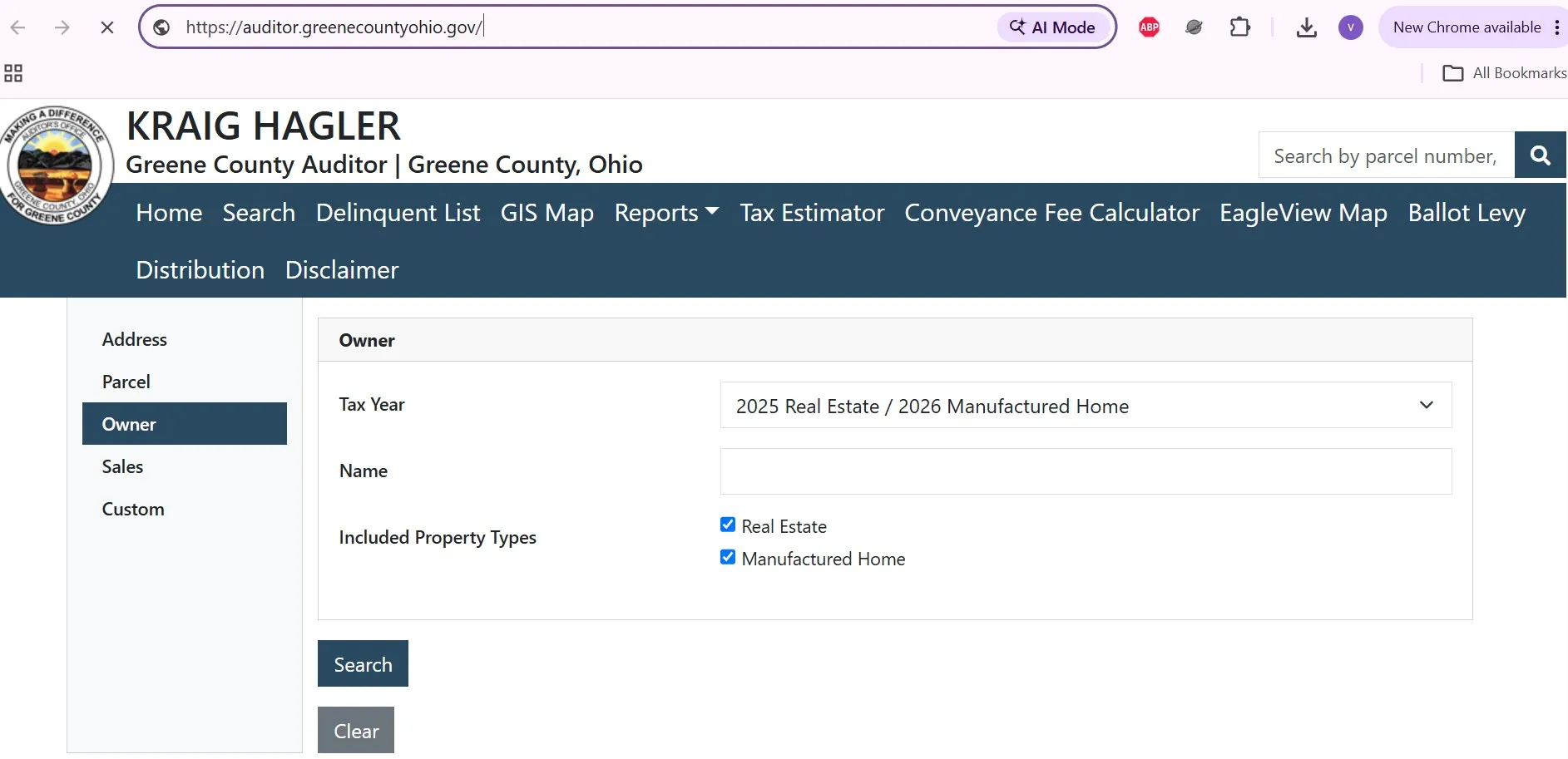
Use the official Greene County Auditor search and choose the method matching the information you already have: owner name, address or property number. Select the tax year, keep both Real Estate and Manufactured Home checked when unsure, open the matching property number and verify the address before using its value, tax or map information.
General property and Auditor help.
Appraisal, ownership and parcel-record questions.
Xenia, OH 45385
Monday–Friday, 7:30 a.m.–4:30 p.m.
After reviewing the four-step workflow above, open the official portal. Begin with the least restrictive search and add more detail only when the result list is too broad.
What to select on the Greene County search page
Choose the property problem you need to solve
The article is organised around actions rather than a directory of government links.
Which Greene County office handles your task?
Identify the property through the Auditor first, save its property number and then contact the office that controls the specific action.
What you need |
Office or tool |
What it provides |
Important limit |
|---|---|---|---|
Owner, address, value or building information |
Auditor property search |
Ownership display, property number, location, land use, value, building and tax information. |
The owner display is not a title opinion. |
Pay or verify a property-tax bill |
Treasurer |
Bills, payment posting, fees, escrow and delinquency help. |
The Auditor does not collect the payment. |
Parcel map, aerial image or GIS layer |
GIS |
Parcel context, aerial imagery, map layers, downloadable maps and survey links. |
GIS lines are not legal boundary surveys. |
Deed, mortgage, lien, plat or recorded survey |
Recorder |
Recorded-document indexes, images, transfer tracking and certified-copy help. |
Public search results are not title insurance. |
Challenge appraised market value |
Board of Revision |
DTE 1 complaint review, settlement offer or hearing. |
The Board reviews value, not dissatisfaction with tax rates. |
Homestead, owner occupancy or CAUV |
Auditor Real Estate Department |
Eligibility information, applications, renewals and property-relief records. |
Each programme has separate rules and deadlines. |
Search Greene County property records correctly
- Select the applicable tax year.
- Enter the last name first.
- Leave the first name blank during the first attempt.
- Add the first name only if too many records appear.
- Try a trust, company, estate or former-owner name when needed.
- Enter the street number.
- Add the main street name.
- Leave pre-direction, suffix, post-direction and unit blank initially.
- Add the city only when the result list is too broad.
- Verify the property number before using the record.
- Copy the full number from a bill, deed or prior record.
- Enter every digit and separator exactly.
- If it fails, check for a missing zero or mistyped character.
- Confirm whether the record is real estate or a manufactured home.
- Match the resulting address before continuing.
What to do after the result appears
Information worth saving
After following the search method above, use the official owner, location or property-number page. Avoid opening all three portals at once; choose the one that matches your strongest identifier.
No Greene County property result found?
Follow these fixes in order before assuming the property is missing.
Prepare this before contacting Real Estate staff
Understand the Greene County property record
Greene County’s Real Estate Department maintains information for more than 73,000 parcels. The record supports appraisal and tax assessment, but different fields answer different questions.
Field |
What it means |
Practical next action |
|---|---|---|
Property number |
The county identifier assigned to the parcel or property record. |
Save it for tax, GIS, Recorder, appraisal and transfer questions. |
Owner |
The ownership name currently displayed in the Auditor system. |
Use the recorded deed when legal proof of ownership is required. |
Location |
The physical or situs address associated with the property. |
Do not confuse it with the owner’s mailing address. |
Land use |
The recorded classification or use of the property. |
Contact Real Estate if the actual use is materially different. |
Acreage |
The land area maintained in the parcel record. |
Use a recorded survey for exact legal acreage or boundary questions. |
Appraised value |
The Auditor’s estimate of fair market value for land and improvements. |
Check building facts, sale information and comparable properties before disputing it. |
Taxable value |
Ohio generally assesses real estate at 35% of appraised value. |
Do not apply a random countywide rate; tax districts and reduction factors differ. |
Tax district |
The combination of local taxing authorities affecting the property. |
Use the correct district in the property-tax estimator. |
Building description |
Recorded characteristics such as footprint, age, use, area and improvements. |
Submit a property-information correction when a material fact is wrong. |
Transfer information |
Sale, ownership and conveyance data associated with the parcel. |
Use the Recorder for the actual deed image and legal instrument. |
Tax bill |
The parcel-specific liability collected by the Treasurer. |
Open the exact bill rather than estimating a payment. |
Check these building and land facts
- Incorrect building square footage
- Wrong number of buildings or improvements
- Demolished structure still displayed
- Incorrect land use or acreage
- Wrong owner-occupancy or exemption status
- Recent photographs
- Measurements or floor plans
- Permit or demolition records
- Recorded survey or deed
- Repair estimates or damage reports
Understand your new 2026 property value
Greene County is completing its required tax-year 2026 reappraisal. The new 2026 value affects property taxes paid during calendar year 2027—not the second-half 2026 bill currently being collected.
Tentative-value letters were mailed to property owners.
The published informal-review period has ended.
Greene County plans to post final values and calculate taxes.
Board of Revision filing period for the 2026 value.
What to check before final values are posted
Use the property-tax estimator carefully
Use the official revaluation page for the live calendar and final-value announcements. Use the estimator only after copying the correct class, district and proposed value from the property record.
View and pay the 2026 Greene County tax bill
Greene County delayed its second-half tax-year 2025 real-estate bills while implementing Ohio’s Inflation Cap Credit. Bills were mailed July 10, 2026, and the timely-payment deadline was extended to Friday, August 14, 2026.
Open the exact tax bill
Payment method |
Published fee |
Practical warning |
|---|---|---|
Credit card |
2.35% convenience fee with a $2 minimum. |
Review the dollar fee before authorising a large tax payment. |
Debit card |
$2.95 flat fee. |
Confirm the processor identifies the payment as debit. |
eCheck |
$0.75 flat fee. |
Verify the bank routing and account numbers carefully. |
Mailing close to the deadline
USPS postmark practices changed on December 24, 2025. The printed postmark may reflect the date the envelope reaches sorting machinery rather than the day it was placed in a mailbox.
Tax-payment contact
Xenia, OH 45385
Monday–Friday
7:30 a.m.–4:30 p.m.
After confirming the property number and exact balance, use the official Treasurer page. The payment processor’s convenience fee goes to Point & Pay rather than the Greene County Treasurer.
Use Greene County GIS without misreading property lines
Greene County GIS supports real-estate appraisal, planning, emergency services, utilities and other county functions. Its parcel and aerial data are useful research tools, but the county publishes them “as is” and does not guarantee legal boundary accuracy.
Find a parcel, map or survey record
Need |
Best source |
Important warning |
|---|---|---|
Locate a parcel |
GIMS parcel viewer |
Match the property number and address. |
Compare visible changes |
Historic aerial imagery |
The image date may not reflect current improvements. |
Review a subdivision |
Recorded plat through the Recorder |
Use cabinet/page or converted book/page references. |
Find a survey |
GIS Survey Record or Recorder search |
A prior survey may not resolve a current boundary dispute. |
Exact property line |
Licensed surveyor and recorded documents |
Do not rely on the GIS line alone. |
Custom printed map |
Greene County GIS staff |
Published fees depend on size and whether ortho imagery is included. |
Xenia, OH 45385
Monday–Friday
7:30 a.m.–4:30 p.m.
Use the GIS page after saving the property number. Use the Survey Information page when you already have a survey volume/page or plat reference and need the exact click path.
Search Greene County recorded property documents
Use the Recorder when you need the actual legal instrument. The Auditor record can provide ownership and transfer clues, but the Recorder maintains deeds, mortgages, liens, releases, plats and other recorded documents.
Search the Recorder step by step
Records are indexed from 1984 forward.
Check the status of a recently submitted property transfer.
Convert an older Plat Book and Page to Plat Cabinet and Page.
Register names for document-filing notifications.
After gathering the owner and transfer details, open the official Recorder page. Select Document Search for records, Transfer Tracking for a recently submitted deed or Property Fraud Alert for future filing notifications.
Challenge a Greene County property value
A successful complaint needs evidence specific to the property. General statements about inflation, neighbourhood prices or a high tax bill do not prove that the Auditor’s market value is wrong.
Prepare evidence that answers the valuation question
Reason for challenge |
Useful evidence |
Mistake to avoid |
|---|---|---|
Recent sale |
Purchase agreement, closing statement and listing history showing list price and days on market. |
Providing only the sale price without transaction context. |
Independent appraisal |
Complete appraisal and an appraiser willing to testify if a hearing is scheduled. |
Submitting an appraisal that cannot be explained or defended. |
Condition problems |
Photographs, completed-work records, repair estimates and inspection reports. |
Making undocumented statements about poor condition. |
Income-producing property |
Available income and expense statements for the previous three years. |
Using residential-sale comparisons alone for an income property. |
Record error |
Measurements, surveys, permits, demolition proof or corrected property information. |
Filing a value complaint before requesting a factual correction. |
Formal Board of Revision process
After organising property-specific evidence, use the official contesting-value page for the correct form and the Board process page for settlement, hearing and attendance rules.
Check owner occupancy, Homestead and CAUV
Programme |
Main purpose |
Important eligibility clue |
Form or action |
|---|---|---|---|
Owner-Occupancy Credit |
Reduction for a qualifying principal residence. |
Owner must own and occupy the home as the principal residence on January 1. |
File DTE 105C by December 31 of the applicable year. |
Homestead Exemption |
Additional relief for qualifying homeowners. |
Age, disability, income, veteran or surviving-spouse rules may apply. |
Use DTE 105A, 105I, 105K or another applicable form. |
CAUV |
Values qualifying farmland according to agricultural use. |
Generally 10 acres or more, or qualifying $2,500 average gross agricultural income for smaller acreage. |
File the initial application and renew every year. |
Damaged property |
Requests a value deduction after qualifying destruction or damage. |
Material damage during an applicable period. |
Use DTE 26 with damage evidence. |
Owner-Occupancy Credit
The property must be the homeowner’s principal residence on January 1 of the application year. The reduction does not apply to rental homes, corporation-owned homes, homes occupied by someone other than the owner or excess acreage over one acre under the county’s published rules.
CAUV application and renewal
- Commercial agricultural use
- Generally 10 or more qualifying acres
- Or $2,500 average gross agricultural income for smaller acreage
- Three prior years of qualifying commercial agricultural use
- $25 initial filing fee
- Renew every year
- File before the first Monday in March
- Expect annual visual field inspections
- Report ownership or land-use changes
- Contact Real Estate before filing when eligibility is uncertain
Common forms
After identifying the programme, use the current Greene County forms page rather than an old PDF saved from another county. Local filing instructions and supporting-document requirements can differ.
Prepare a deed transfer or parcel change
Greene County requires the map department to approve deeds before they are presented to the Auditor. The Recorder records the document only after the required map, conveyance and preparation steps are completed.
Transfer-preparation checklist
Fee |
Published amount |
Example or warning |
|---|---|---|
Conveyance and transfer fee |
$2 per $1,000 of purchase price. |
Pennies are rounded up to the next $0.10. |
Parcel transfer fee |
$0.50 per parcel. |
Count every property number included in the deed. |
Official county example |
$490.60 on a $245,250 purchase. |
This example does not include separate Recorder or professional fees. |
Use the conveyance calculator
After preparing the deed and legal description, use the official Property Transfer page for the county checklist. Use the calculator only as an estimate and confirm special circumstances with Real Estate staff.
Greene County property contacts and office map
Office |
Use it for |
Contact |
Address and hours |
|---|---|---|---|
Auditor |
General property, appraisal, credits, forms and valuation questions. |
69 Greene St., Xenia, OH 45385 Monday–Friday, 7:30 a.m.–4:30 p.m. |
|
Real Estate |
Parcel, ownership, property facts, appraisal and record corrections. |
Auditor office at 69 Greene Street. |
|
Treasurer |
Tax bills, payment, posting, escrow and delinquency. |
15 Greene St., Xenia, OH 45385 Monday–Friday, 7:30 a.m.–4:30 p.m. |
|
GIS |
Parcel viewer, map layers, imagery, data and custom maps. |
69 Greene St., Xenia, OH 45385 Monday–Friday, 7:30 a.m.–4:30 p.m. |
|
Recorder |
Deeds, mortgages, liens, plats, surveys and recorded documents. |
69 Greene St., 3rd Floor, Xenia, OH 45385 Business hours 7:30 a.m.–4:30 p.m. |
Prepare before calling or visiting
Check a neighbouring county when the address is near the boundary
Postal cities and road names can cross county-search expectations. Confirm the actual county before repeatedly searching Greene County.
Useful near the western Greene County boundary and Dayton-area mailing addresses.
Montgomery County property search guideUseful near the northern boundary and Springfield-area properties.
Clark County property search guideUseful for properties near Greene County’s northeastern area.
Madison County property search guideUseful near the southwestern boundary and properties approaching the Lebanon area.
Warren County property search guideWhat an online property record cannot prove
- Finding a parcel or manufactured-home record
- Reviewing the current owner display
- Checking values, taxes and building facts
- Locating maps, deeds, surveys and forms
- Preparing questions for county staff
- Legal ownership or title
- Exact property boundaries
- Unreleased liens or easements
- Building or zoning permission
- Purchase, lending or legal decisions
Greene County property search FAQs
How do I search Greene County property records by owner name?
Open the official Greene County Auditor owner search, choose the tax year and begin with the owner’s last name. Add the first name only if too many results appear, then verify the record using the property address and property number.
Can I search a Greene County property by address?
Yes. Use the official location search and begin with the street number and main street name. Leave directional letters, suffixes and unit information blank during the first attempt, then add them only when needed.
What is a Greene County property number?
The property number is the county identifier assigned to a parcel or manufactured-home record. Save it because it is the most reliable identifier for property searches, tax questions, GIS research, valuation reviews and county-office calls.
Why is the new owner not showing in the property search?
A recently recorded transfer may still be moving through the Auditor, map and Recorder workflow. Search the prior owner, check the Recorder’s transfer-tracking or document-search tools and contact the Real Estate Department if the display remains unchanged.
How does the 2026 Greene County revaluation affect taxes?
Greene County’s tax-year 2026 revaluation affects property taxes paid during calendar year 2027. Tentative values were mailed in June 2026, final values are scheduled for December 2026 and formal Board of Revision complaints may be filed from January 1 through March 31, 2027.
When are second-half 2026 Greene County property taxes due?
Greene County extended the second-half tax-year 2025 real-estate payment deadline to Friday, August 14, 2026. Property owners should view the exact bill before paying because estimated payments can produce an overpayment.
Are Greene County GIS parcel lines legally exact?
No. Greene County GIS maps and parcel lines are reference tools and are not guaranteed legal boundary surveys. Use recorded deeds, plats and survey records and consult a licensed surveyor before making a boundary or construction decision.
Where can I find a Greene County deed or mortgage?
Use the Greene County Recorder’s official document search. The Recorder states that records are indexed online from 1984 forward and also provides plat conversion, transfer tracking and property-fraud alert tools.
How do I challenge a Greene County property value?
Use the DTE 1 complaint for a market-value challenge and file it between January 1 and March 31 of the following tax year. Provide property-specific evidence such as a sale, appraisal, listing history, repair estimates, photographs or income and expense records.
Who should I call about a Greene County property record?
Call the Greene County Auditor at 937-562-5065 for general property help or the Real Estate Department at 937-562-5072 for parcel, appraisal and ownership questions. Call the Treasurer at 937-562-5017 for tax payments and the Recorder at 937-562-5270 for deeds and recorded documents.

Khushboo Bobade is the editor and digital publisher of CountyAuditors.org. She oversees the research and editorial process for the website, ensuring that information about county auditor offices, property records, and government resources is accurate, verified, and easy for visitors to understand.
10 Ohio Property Tax Calculators & Auditor Tools
Built specifically for Ohio's 35% assessment ratio, current DTE forms, and 2026 Homestead, Owner-Occupancy, CAUV, Conveyance Fee, and Board of Revision rules. Every number reflects verified Ohio Department of Taxation amounts.
Annual Tax Bill Estimator
OHIOApplies Ohio's 35% assessment ratio plus your county's effective millage tier — the actual math your auditor uses.
Homestead Reduction Calculator
DTE 105A2026 Ohio Homestead: $29,000 general or $58,000 enhanced (100% disabled vet, KIA spouse). OAGI under $41,000 required for non-veteran applicants.
Owner-Occupancy & Non-Business Credits
DTE 105CEvery Ohio owner-occupied home qualifies for the 2.5% Owner-Occupancy Credit plus the automatic 10% Non-Business Credit. Most owners don't realize these stack.
Conveyance Fee Calculator
ORC 322When you sell or transfer Ohio property, the auditor collects $1 state + up to $3 county per $1,000, plus $0.50 per parcel. Counties choose their rate.
CAUV Agricultural Savings
DTE 109Ohio's Current Agricultural Use Value cuts taxable value dramatically for farmland (10+ acres, or smaller with $2,500+ annual gross income).
Mill Rate Converter
Ohio tax rates appear three ways on auditor sites: mills, percent, or dollars per $1,000. Convert between them instantly.
Parcel Number Cleaner
Ohio's 88 counties each format parcels differently — Franklin uses 010-123456-00, Cuyahoga uses 001-23-456, Hamilton uses 100-0001-0001-00. Auto-detects.
35% Ratio Sanity Check
Ohio law sets taxable value at 35% of market value. If yours is significantly higher, you're a strong BOR appeal candidate.
BOR Appeal Savings
DTE 1A successful Board of Revision complaint typically cuts your value 10–20%. Filing is free and stays in effect until the next reappraisal.
BOR Deadline Countdown
MAR 31Ohio's statutory Board of Revision filing deadline is March 31 for the prior tax year. Miss it and you wait until next year — no extensions.
Verify with the official Ohio source
These calculators use the verified 2026 Ohio Department of Taxation amounts and statutory rules. For your exact bill, exemption status, and county-specific deadlines, always confirm with your county auditor and the Ohio Revised Code:
Estimates use Ohio's 35% statutory assessment ratio and effective tax rate tiers averaged across major Ohio counties. Your actual bill depends on local school levies, voted millage, inside vs. outside millage splits, House Bill 920 reduction factors (HB 920), and special assessments. The 2026 Homestead general amount ($29,000) and enhanced amount ($58,000) reflect HB 187 inflation indexing — your county auditor's office may show slightly different transitional figures. Nothing here is legal or tax advice. CountyAuditors.org is an independent informational directory, not affiliated with any county government.